<?xml version="1.0" encoding="utf-8"?><feed xmlns="http://www.w3.org/2005/Atom" ><generator uri="https://jekyllrb.com/" version="4.4.1">Jekyll</generator><link href="https://brick.directory/feed.xml" rel="self" type="application/atom+xml" /><link href="https://brick.directory/" rel="alternate" type="text/html" /><updated>2026-02-28T17:48:58+00:00</updated><id>https://brick.directory/feed.xml</id><title type="html">Brick Directory - The Missing Piece</title><subtitle>Connect your AI assistant to comprehensive LEGO data via Model Context Protocol (MCP). Access LEGO sets, parts, minifigures, and pricing through Claude, ChatGPT, Gemini.</subtitle><entry><title type="html">Complete Guide to MCP for LEGO Data Integration</title><link href="https://brick.directory/blog/2025/12/15/complete-guide-to-mcp-for-lego-data/" rel="alternate" type="text/html" title="Complete Guide to MCP for LEGO Data Integration" /><published>2025-12-15T00:00:00+00:00</published><updated>2025-12-15T00:00:00+00:00</updated><id>https://brick.directory/blog/2025/12/15/complete-guide-to-mcp-for-lego-data</id><content type="html" xml:base="https://brick.directory/blog/2025/12/15/complete-guide-to-mcp-for-lego-data/"><![CDATA[<h1 id="complete-guide-to-mcp-for-lego-data-integration">Complete Guide to MCP for LEGO Data Integration</h1>

<p><strong>Model Context Protocol (MCP)</strong> is transforming how AI assistants access external data, and Brick Directory brings this power to the LEGO universe. Connect your AI assistant to query comprehensive LEGO databases directly through natural conversation.</p>

<h2 id="what-is-mcp">What is MCP?</h2>

<p>Model Context Protocol is an open standard that allows AI assistants to connect to external data sources securely and efficiently. Instead of copying and pasting LEGO set numbers or manually searching databases, your AI assistant can access real-time information about:</p>

<ul>
  <li><strong>70,000+ LEGO sets</strong> with detailed information and images</li>
  <li><strong>Parts and minifigures</strong> with specifications and colors</li>
  <li><strong>BrickLink pricing and marketplace</strong> data</li>
  <li><strong>Rebrickable collection management</strong> for sets, parts, and MOCs</li>
  <li><strong>Brickset reviews and community</strong> data</li>
  <li><strong>BrickEconomy investment tracking</strong> and valuation</li>
  <li><strong>BrickOwl marketplace</strong> inventory management</li>
</ul>

<h2 id="why-use-mcp-for-lego-data">Why Use MCP for LEGO Data?</h2>

<h3 id="instant-access-to-comprehensive-data">Instant Access to Comprehensive Data</h3>

<p>Ask questions like:</p>
<ul>
  <li>“What minifigures come with LEGO set 76240?”</li>
  <li>“Show me all Castle sets from the 1990s”</li>
  <li>“What’s the current BrickLink price for set 10030?”</li>
  <li>“How many pieces are in the UCS Millennium Falcon?”</li>
</ul>

<p>Your AI assistant retrieves accurate, up-to-date information instantly.</p>

<h3 id="natural-conversation-interface">Natural Conversation Interface</h3>

<p>No need to learn complex APIs or database queries. Just ask in plain English:</p>

<blockquote>
  <p>“I’m building a medieval castle MOC. What parts should I use for the walls?”</p>
</blockquote>

<p>The AI understands context and provides relevant LEGO parts data with images, compatibility information, and purchasing links.</p>

<h3 id="ai-platform-support">AI Platform Support</h3>

<p>Brick Directory’s MCP server works with:</p>
<ul>
  <li><strong>Claude Desktop</strong> - Full native MCP support</li>
  <li><strong>Claude Web</strong> - Via custom connectors</li>
  <li><strong>ChatGPT</strong> - MCP support in beta (limited availability)</li>
  <li><strong>Google Gemini CLI</strong> - Via SSE transport</li>
  <li><strong>Any MCP-compatible AI assistant</strong> - Standard protocol implementation</li>
</ul>

<h2 id="getting-started-with-brick-directory-mcp">Getting Started with Brick Directory MCP</h2>

<h3 id="quick-setup-for-any-mcp-client">Quick Setup for Any MCP Client</h3>

<p>Add this configuration to your AI assistant’s MCP settings:</p>

<div class="language-json highlighter-rouge"><div class="highlight"><pre class="highlight"><code><span class="p">{</span><span class="w">
  </span><span class="nl">"mcpServers"</span><span class="p">:</span><span class="w"> </span><span class="p">{</span><span class="w">
    </span><span class="nl">"brick-directory"</span><span class="p">:</span><span class="w"> </span><span class="p">{</span><span class="w">
      </span><span class="nl">"command"</span><span class="p">:</span><span class="w"> </span><span class="s2">"npx"</span><span class="p">,</span><span class="w">
      </span><span class="nl">"args"</span><span class="p">:</span><span class="w"> </span><span class="p">[</span><span class="s2">"-y"</span><span class="p">,</span><span class="w"> </span><span class="s2">"@modelcontextprotocol/server-fetch"</span><span class="p">,</span><span class="w"> </span><span class="s2">"https://api.brick.directory/connect"</span><span class="p">]</span><span class="w">
    </span><span class="p">}</span><span class="w">
  </span><span class="p">}</span><span class="w">
</span><span class="p">}</span><span class="w">
</span></code></pre></div></div>

<p><a href="/docs/mcp-setup">Detailed setup instructions for Claude, ChatGPT, and Gemini →</a></p>

<h3 id="want-to-try-without-setup">Want to Try Without Setup?</h3>

<p>Use the Brick Directory web chat interface at <a href="https://chat.brick.directory">chat.brick.directory</a> - no installation required. Simply sign in with Google or Facebook and start asking questions about LEGO sets, parts, and prices.</p>

<p><strong>Note</strong>: The web chat is a separate interface from ChatGPT. It provides instant access to all Brick Directory features through your browser.</p>

<h2 id="real-world-use-cases">Real-World Use Cases</h2>

<h3 id="1-collection-management">1. Collection Management</h3>

<p>“Show me all LEGO City sets I own and their current value on BrickLink”</p>

<p>The AI assistant accesses your Rebrickable collection and provides detailed value analysis.</p>

<h3 id="2-moc-building">2. MOC Building</h3>

<p>“I want to build a spaceship MOC. What transparent blue pieces are available?”</p>

<p>Get comprehensive parts lists with images, compatibility, and availability.</p>

<h3 id="3-investment-tracking">3. Investment Tracking</h3>

<p>“What’s the BrickEconomy value for set 75192?”</p>

<p>Track investment value and market trends for your collection using BrickEconomy data.</p>

<h3 id="4-price-research">4. Price Research</h3>

<p>“What’s the current BrickLink price for LEGO set 10030?”</p>

<p>Get real-time marketplace pricing for individual sets to make informed purchasing decisions.</p>

<h2 id="technical-advantages">Technical Advantages</h2>

<h3 id="find-similar-sets">Find Similar Sets</h3>

<p>Brick Directory can find sets with similar brick inventories:</p>
<ul>
  <li><strong>Search by part composition</strong> - Find sets that contain similar pieces</li>
  <li><strong>Discover alternatives</strong> when a set is retired or unavailable</li>
  <li><strong>Useful for MOC planning</strong> - Find sets with the parts you need</li>
</ul>

<h3 id="comprehensive-data-sources">Comprehensive Data Sources</h3>

<p>Multiple integrated services provide complete LEGO information:</p>
<ul>
  <li><strong>Rebrickable</strong> - Set details, parts, MOCs, and collection management</li>
  <li><strong>BrickLink</strong> - Market pricing and marketplace data</li>
  <li><strong>Brickset</strong> - Reviews, instructions, and community ratings</li>
  <li><strong>BrickEconomy</strong> - Investment tracking and value trends</li>
  <li><strong>BrickOwl</strong> - Marketplace inventory management</li>
</ul>

<h3 id="performance">Performance</h3>

<ul>
  <li><strong>Fast responses</strong> optimized for conversational AI</li>
  <li><strong>Efficient caching</strong> reduces API calls and improves speed</li>
  <li><strong>Scalable architecture</strong> handles multiple concurrent users</li>
</ul>

<h2 id="privacy-and-security">Privacy and Security</h2>

<p>Brick Directory takes your privacy seriously:</p>
<ul>
  <li><strong>OAuth2 authentication</strong> - Secure login via Google or Facebook</li>
  <li><strong>Encrypted credentials</strong> - Your API keys are stored with AES-256 encryption</li>
  <li><strong>Transparent data practices</strong> - Clear privacy policy and GDPR compliance</li>
  <li><strong>User control</strong> - Delete your data and credentials anytime</li>
</ul>

<p><a href="/docs/privacy-policy">Read our complete Privacy Policy →</a></p>

<h2 id="advanced-features">Advanced Features</h2>

<h3 id="collection-management">Collection Management</h3>

<p>Integrated tools for managing your LEGO collection:</p>
<ul>
  <li><strong>Rebrickable integration</strong> - Manage set lists, part lists, and lost parts</li>
  <li><strong>Brickset integration</strong> - Track your collection and wishlist</li>
  <li><strong>Build analysis</strong> - Analyze what you need to complete sets</li>
  <li><strong>MOC support</strong> - Access alternative builds and custom creations</li>
</ul>

<h3 id="marketplace-tools">Marketplace Tools</h3>

<p>Direct integration with LEGO marketplaces:</p>
<ul>
  <li><strong>BrickLink pricing</strong> - Get current market values for sets and parts</li>
  <li><strong>BrickEconomy tracking</strong> - Monitor investment value over time</li>
  <li><strong>BrickOwl inventory</strong> - Manage your marketplace listings</li>
  <li><strong>Multi-currency support</strong> - Pricing in your preferred currency</li>
</ul>

<h2 id="community-and-support">Community and Support</h2>

<p>Stay connected with Brick Directory:</p>
<ul>
  <li><strong>Bluesky</strong>: <a href="https://bsky.app/profile/brick.directory">@brick.directory</a></li>
  <li><strong>Instagram</strong>: <a href="https://www.instagram.com/brick.directory/">@brick.directory</a></li>
  <li><strong>Threads</strong>: <a href="https://www.threads.com/@brick.directory">@brick.directory</a></li>
  <li><strong>YouTube</strong>: <a href="https://www.youtube.com/@brick.directory">@brick.directory</a></li>
  <li><strong>Contact</strong>: Visit our <a href="/docs/contact">contact page</a> for support inquiries</li>
  <li><strong>FAQ</strong>: Check our <a href="/docs/faq">frequently asked questions</a> for quick answers</li>
</ul>

<h2 id="conclusion">Conclusion</h2>

<p>Model Context Protocol brings the power of comprehensive LEGO data directly to your AI assistant. Whether you’re a casual builder, serious collector, or MOC creator, Brick Directory provides instant access to the information you need through natural conversation.</p>

<h3 id="get-started">Get Started</h3>

<p><strong>Connect via MCP</strong> (for Claude, ChatGPT, Gemini):</p>
<ul>
  <li><a href="/docs/mcp-setup">Setup Guide →</a></li>
  <li>Configuration: <code class="language-plaintext highlighter-rouge">https://api.brick.directory/connect</code></li>
  <li>Full native integration with your AI assistant</li>
</ul>

<p><strong>Try Without Setup</strong> (web browser):</p>
<ul>
  <li><a href="https://chat.brick.directory">chat.brick.directory</a></li>
  <li>No installation required</li>
  <li>Sign in with Google or Facebook</li>
</ul>

<hr />

<p><em>Have questions? Visit our <a href="/docs/contact">contact page</a> or check the <a href="/docs/faq">FAQ</a>.</em></p>]]></content><author><name>Vladimir Orany</name></author><summary type="html"><![CDATA[Learn how Model Context Protocol (MCP) revolutionizes LEGO data access through AI assistants like Claude, ChatGPT, and Gemini. Get comprehensive LEGO sets, parts, and pricing information instantly.]]></summary></entry><entry><title type="html">How to Connect Claude to Your LEGO Collection Data</title><link href="https://brick.directory/blog/2025/12/14/connect-claude-desktop-to-lego-collection/" rel="alternate" type="text/html" title="How to Connect Claude to Your LEGO Collection Data" /><published>2025-12-14T00:00:00+00:00</published><updated>2025-12-14T00:00:00+00:00</updated><id>https://brick.directory/blog/2025/12/14/connect-claude-desktop-to-lego-collection</id><content type="html" xml:base="https://brick.directory/blog/2025/12/14/connect-claude-desktop-to-lego-collection/"><![CDATA[<h1 id="how-to-connect-claude-to-your-lego-collection-data">How to Connect Claude to Your LEGO Collection Data</h1>

<p><strong>Claude</strong> is a powerful AI assistant that can access comprehensive LEGO data through Model Context Protocol (MCP). This guide shows you how to connect Claude to Brick Directory for instant access to 70,000+ sets, parts information, marketplace pricing, and your personal collection.</p>

<h2 id="what-youll-be-able-to-do">What You’ll Be Able to Do</h2>

<p>Once connected, Claude can answer questions like:</p>

<ul>
  <li>“What minifigures come with LEGO set 75192?”</li>
  <li>“Show me all Castle theme sets from the 1990s”</li>
  <li>“What’s the current BrickLink price for set 10030?”</li>
  <li>“Add set 75192 to my Rebrickable collection”</li>
  <li>“What parts do I need to complete set 10030?”</li>
  <li>“Show me alternative builds for this set”</li>
</ul>

<p>Claude accesses real-time data from Rebrickable, BrickLink, Brickset, BrickEconomy, and BrickOwl once you connect these services.</p>

<h2 id="see-it-in-action">See It In Action</h2>

<p>Watch how Brick Directory works with Claude:</p>

<div style="position: relative; padding-bottom: 56.25%; height: 0; overflow: hidden; max-width: 100%; margin: 2rem 0;">
  <iframe style="position: absolute; top: 0; left: 0; width: 100%; height: 100%;" src="https://www.youtube.com/embed/hTyr9WaNwWw" frameborder="0" allow="accelerometer; autoplay; clipboard-write; encrypted-media; gyroscope; picture-in-picture" allowfullscreen=""></iframe>
</div>

<h2 id="setup-guide">Setup Guide</h2>

<p>All you need is Claude - no additional software required!</p>

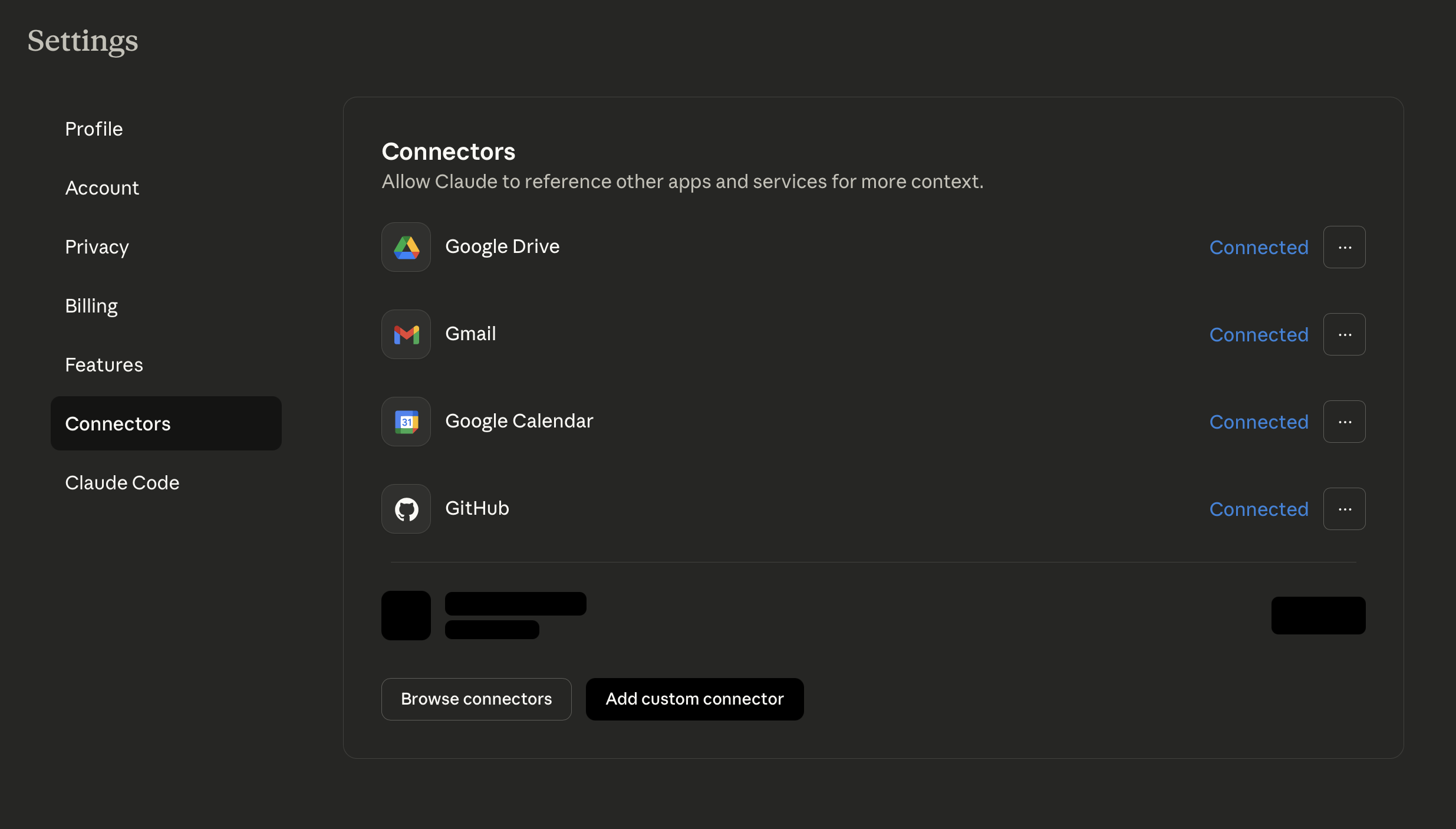
<h3 id="step-1-open-claude-settings">Step 1: Open Claude Settings</h3>

<ol>
  <li>Go to <a href="https://claude.ai">claude.ai</a> and sign in</li>
  <li>Click <strong>Settings</strong> (gear icon in bottom left)</li>
  <li>Navigate to <strong>Connectors</strong></li>
</ol>

<p><img src="/assets/claude-mcp-config.png" alt="Claude Connectors Settings" /></p>

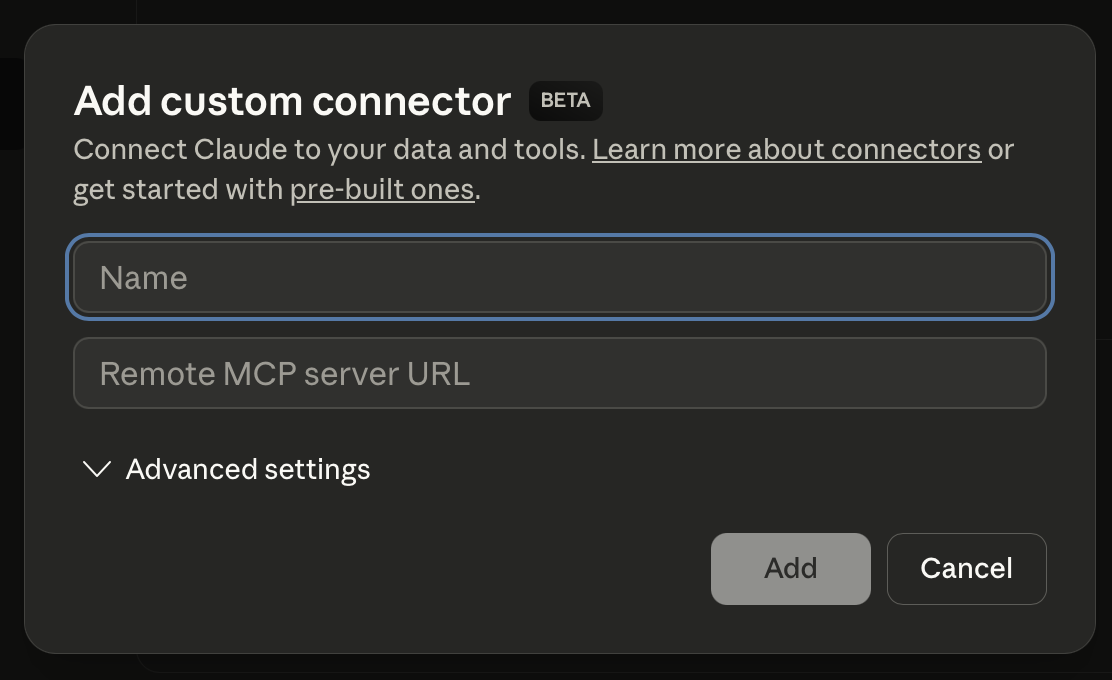
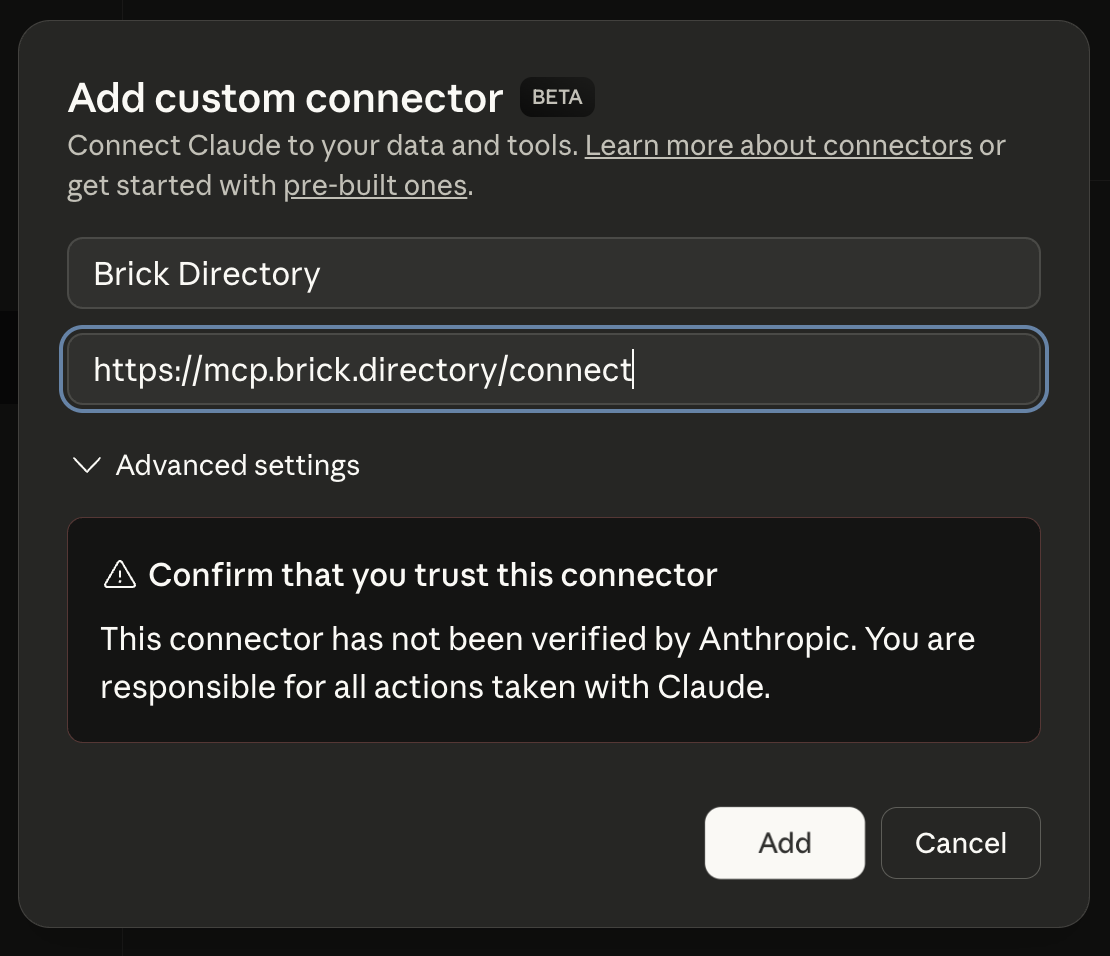
<h3 id="step-2-add-custom-connector">Step 2: Add Custom Connector</h3>

<p>Click <strong>“Add custom connector”</strong> and enter:</p>

<ul>
  <li><strong>Name</strong>: <code class="language-plaintext highlighter-rouge">Brick Directory</code></li>
  <li><strong>Remote MCP server URL</strong>: <code class="language-plaintext highlighter-rouge">https://api.brick.directory/connect</code></li>
</ul>

<p><img src="/assets/claude-mcp-settings.png" alt="Add Custom Connector" /></p>

<h3 id="step-3-authenticate">Step 3: Authenticate</h3>

<p>The first time you use Brick Directory, you’ll be prompted to authenticate:</p>
<ol>
  <li>Browser window opens automatically</li>
  <li>Sign in with Google or Facebook</li>
  <li>Authorization completes and you’re connected!</li>
</ol>

<p><img src="/assets/claude-mcp-success.png" alt="Connector Success" /></p>

<h3 id="step-4-start-using-brick-directory">Step 4: Start Using Brick Directory</h3>

<p>Ask Claude about LEGO data:</p>

<blockquote>
  <p>“What minifigures come with LEGO set 75192?”</p>
</blockquote>

<p>Claude will use Brick Directory to provide detailed information!</p>

<hr />

<p><strong>Using Claude Desktop?</strong> The setup is similar - just add the connector through your config file:</p>

<details>
<summary><strong>Click to show Claude Desktop configuration</strong></summary>

**Configuration file location:**
- macOS/Linux: `~/.config/claude/claude_desktop_config.json`
- Windows: `%APPDATA%\Claude\claude_desktop_config.json`

**Add this configuration:**
```json
{
  "mcpServers": {
    "brick-directory": {
      "command": "npx",
      "args": ["-y", "@modelcontextprotocol/server-fetch", "https://api.brick.directory/connect"]
    }
  }
}
```

Restart Claude Desktop. Authentication works the same way (browser opens automatically).

</details>

<h2 id="connecting-your-personal-collection">Connecting Your Personal Collection</h2>

<p>Want Claude to access <strong>your personal LEGO collection</strong>? Configure your service credentials through the Brick Directory settings:</p>

<h3 id="step-1-get-your-api-keys">Step 1: Get Your API Keys</h3>

<p>Get free API keys from these services:</p>

<ul>
  <li><strong>Rebrickable</strong>: <a href="https://rebrickable.com/users/api">rebrickable.com/users/api</a> (for collection management)</li>
  <li><strong>BrickLink</strong>: <a href="https://www.bricklink.com/v3/api.page">bricklink.com/v3/api.page</a> (for pricing data)</li>
  <li><strong>Brickset</strong>: <a href="https://brickset.com/tools/webservices/requestkey">brickset.com/tools/webservices/requestkey</a> (for reviews and images)</li>
  <li><strong>BrickEconomy</strong>: <a href="https://www.brickeconomy.com/account/settings">brickeconomy.com/account/settings</a> (for investment tracking)</li>
  <li><strong>BrickOwl</strong>: <a href="https://www.brickowl.com/apikey">brickowl.com/apikey</a> (for marketplace management)</li>
</ul>

<h3 id="step-2-configure-in-brick-directory">Step 2: Configure in Brick Directory</h3>

<ol>
  <li>Go to <a href="https://chat.brick.directory">chat.brick.directory</a></li>
  <li>Sign in with Google or Facebook</li>
  <li>Click <strong>Settings</strong> (gear icon)</li>
  <li>Add your API keys for the services you want to use</li>
  <li>Credentials are encrypted with AES-256 and stored securely</li>
</ol>

<h3 id="step-3-use-in-claude">Step 3: Use in Claude</h3>

<p>Now when you ask Claude questions through MCP, it can access your collection:</p>

<blockquote>
  <p>“Add set 75192 to my Rebrickable collection”</p>
</blockquote>

<blockquote>
  <p>“Show me all sets in my Rebrickable collection”</p>
</blockquote>

<blockquote>
  <p>“What parts am I missing for set 10030?”</p>
</blockquote>

<h2 id="example-conversations">Example Conversations</h2>

<p>Here are realistic examples of what you can ask Claude:</p>

<h3 id="set-information">Set Information</h3>

<p><strong>You</strong>: “What minifigures come with the UCS Millennium Falcon?”</p>

<p><strong>Claude</strong>: <em>Provides complete minifigure list with images and descriptions from Rebrickable</em></p>

<h3 id="collection-management">Collection Management</h3>

<p><strong>You</strong>: “Add set 10030 to my Rebrickable collection”</p>

<p><strong>Claude</strong>: <em>Adds the set to your collection and confirms</em></p>

<p><strong>You</strong>: “Show me all Star Wars sets in my Rebrickable collection”</p>

<p><strong>Claude</strong>: <em>Lists your Star Wars sets with details</em></p>

<h3 id="parts-research">Parts Research</h3>

<p><strong>You</strong>: “What colors is part 3001 (2x4 brick) available in?”</p>

<p><strong>Claude</strong>: <em>Shows all available colors with images</em></p>

<h3 id="pricing">Pricing</h3>

<p><strong>You</strong>: “What’s the current BrickLink price for set 10030?”</p>

<p><strong>Claude</strong>: <em>Provides current market pricing data from BrickLink</em></p>

<h3 id="alternative-builds">Alternative Builds</h3>

<p><strong>You</strong>: “Show me alternative builds for set 75192”</p>

<p><strong>Claude</strong>: <em>Lists MOCs and alternate builds available on Rebrickable</em></p>

<h2 id="troubleshooting">Troubleshooting</h2>

<h3 id="authentication-issues">Authentication Issues</h3>

<p><strong>Problem</strong>: Browser doesn’t open for authentication</p>

<p><strong>Solution</strong>: Manually visit <a href="https://chat.brick.directory">chat.brick.directory</a> and sign in, then try the MCP connection again</p>

<h3 id="connection-not-working">Connection Not Working</h3>

<p><strong>Problem</strong>: Claude doesn’t seem to use Brick Directory</p>

<p><strong>Solution</strong>:</p>
<ul>
  <li>Verify the URL is exactly: <code class="language-plaintext highlighter-rouge">https://api.brick.directory/connect</code></li>
  <li>Restart Claude Desktop after configuration changes</li>
  <li>Check that the connector shows as active in Claude Web settings</li>
</ul>

<h3 id="api-key-errors">API Key Errors</h3>

<p><strong>Problem</strong>: “API key invalid” or “Not configured” errors</p>

<p><strong>Solution</strong>:</p>
<ol>
  <li>Go to <a href="https://chat.brick.directory">chat.brick.directory</a></li>
  <li>Open Settings and verify your API keys are entered correctly</li>
  <li>Test the keys directly on the service website (Rebrickable, BrickLink, etc.)</li>
</ol>

<h3 id="slow-responses">Slow Responses</h3>

<p><strong>Note</strong>: First queries may take a few seconds while data loads. Subsequent queries are much faster due to caching.</p>

<h2 id="privacy-and-security">Privacy and Security</h2>

<p>Brick Directory protects your data:</p>

<ul>
  <li><strong>OAuth2 Authentication</strong>: Secure login via Google or Facebook</li>
  <li><strong>Encrypted Credentials</strong>: Your API keys are encrypted with AES-256</li>
  <li><strong>GDPR Compliant</strong>: Full compliance with EU data protection regulations</li>
  <li><strong>User Control</strong>: Delete your data and credentials anytime from settings</li>
</ul>

<p><a href="/docs/privacy-policy">Read our complete Privacy Policy →</a></p>

<h2 id="what-you-can-do-now">What You Can Do Now</h2>

<p>With Claude connected to Brick Directory, you can:</p>

<ol>
  <li><strong>Query LEGO Data</strong> - Get instant information about any set, part, or minifigure</li>
  <li><strong>Manage Your Collection</strong> - Add/remove sets from Rebrickable and Brickset</li>
  <li><strong>Check Prices</strong> - Get current marketplace prices from BrickLink and BrickOwl</li>
  <li><strong>Find Parts</strong> - Search for specific parts and colors</li>
  <li><strong>Discover Alternatives</strong> - Find MOCs and alternate builds</li>
</ol>

<p><strong>Watch it in action</strong>: See our <a href="https://www.youtube.com/watch?v=hTyr9WaNwWw">YouTube demo</a> for examples.</p>

<h2 id="powerful-multi-mcp-workflows">Powerful Multi-MCP Workflows</h2>

<p>One of the most powerful features of using Brick Directory through Claude’s MCP is the ability to <strong>combine multiple MCP connectors</strong> in a single conversation. Claude can use Brick Directory alongside other tools to create sophisticated workflows.</p>

<h3 id="example-gmail--brick-directory">Example: Gmail + Brick Directory</h3>

<p>In the video above, you can see Claude using <strong>two MCP connectors simultaneously</strong>:</p>
<ol>
  <li><strong>Gmail connector</strong> - To read LEGO.com purchase confirmation emails</li>
  <li><strong>Brick Directory</strong> - To automatically add those purchased sets to your Rebrickable collection</li>
</ol>

<p>This creates a powerful automation: Claude reads your LEGO order confirmations and syncs your collection automatically!</p>

<h3 id="example-google-sheets--brick-directory">Example: Google Sheets + Brick Directory</h3>

<p>Similarly, you could combine:</p>
<ul>
  <li><strong>Google Sheets MCP</strong> - To read your collection spreadsheet</li>
  <li><strong>Brick Directory</strong> - To sync that data to Rebrickable, Brickset, or BrickEconomy</li>
</ul>

<p>Ask Claude: “Read my LEGO collection from Google Sheet and add all sets to my Rebrickable collection”</p>

<h3 id="why-this-matters">Why This Matters</h3>

<p>This multi-MCP capability is <strong>only available when using Claude</strong> (Web or Desktop). The standalone Brick Directory chat app at <a href="https://chat.brick.directory">chat.brick.directory</a> doesn’t support combining with other tools.</p>

<p><strong>Choose based on your needs:</strong></p>
<ul>
  <li><strong>Use Claude with MCP</strong> if you want to combine LEGO data with Gmail, Google Sheets, GitHub, or other services</li>
  <li><strong>Use chat.brick.directory</strong> if you only need LEGO-specific features with simpler setup</li>
</ul>

<h2 id="alternative-no-setup-required">Alternative: No Setup Required</h2>

<p>Don’t want to configure MCP? Use our standalone web chat interface:</p>

<p><strong><a href="https://chat.brick.directory">chat.brick.directory</a></strong></p>

<p>Same features, zero setup:</p>
<ul>
  <li>OAuth2 authentication (Google, Facebook)</li>
  <li>Real-time AI responses</li>
  <li>Full access to all Brick Directory tools</li>
  <li>Settings management for your API keys</li>
  <li>Works on any device with a browser</li>
</ul>

<h2 id="community-and-support">Community and Support</h2>

<p>Stay connected with Brick Directory:</p>

<ul>
  <li><strong>Bluesky</strong>: <a href="https://bsky.app/profile/brick.directory">@brick.directory</a></li>
  <li><strong>Instagram</strong>: <a href="https://www.instagram.com/brick.directory/">@brick.directory</a></li>
  <li><strong>Threads</strong>: <a href="https://www.threads.com/@brick.directory">@brick.directory</a></li>
  <li><strong>YouTube</strong>: <a href="https://www.youtube.com/@brick.directory">@brick.directory</a></li>
  <li><strong>Contact</strong>: Visit our <a href="/docs/contact">contact page</a> for support</li>
  <li><strong>FAQ</strong>: Check our <a href="/docs/faq">frequently asked questions</a></li>
</ul>

<h2 id="conclusion">Conclusion</h2>

<p>Connecting Claude to Brick Directory unlocks comprehensive LEGO data access through natural conversation. Whether you’re using Claude Web or Claude Desktop, you can now ask questions about sets, manage your collection, and get marketplace pricing—all through simple conversation.</p>

<p><strong>Get started today</strong>: Add the Brick Directory connector to Claude!</p>

<hr />

<p><em>Have questions? Visit our <a href="/docs/contact">contact page</a> or check the <a href="/docs/faq">FAQ</a>.</em></p>]]></content><author><name>Vladimir Orany</name></author><summary type="html"><![CDATA[Step-by-step guide to connecting Claude (Web and Desktop) with Brick Directory MCP server for instant access to LEGO sets, parts, pricing, and your personal collection.]]></summary></entry><entry><title type="html">Top 10 Questions to Ask Your AI LEGO Assistant</title><link href="https://brick.directory/blog/2025/12/13/top-10-questions-ask-ai-lego-assistant/" rel="alternate" type="text/html" title="Top 10 Questions to Ask Your AI LEGO Assistant" /><published>2025-12-13T00:00:00+00:00</published><updated>2025-12-13T00:00:00+00:00</updated><id>https://brick.directory/blog/2025/12/13/top-10-questions-ask-ai-lego-assistant</id><content type="html" xml:base="https://brick.directory/blog/2025/12/13/top-10-questions-ask-ai-lego-assistant/"><![CDATA[<h1 id="top-10-questions-to-ask-your-ai-lego-assistant">Top 10 Questions to Ask Your AI LEGO Assistant</h1>

<p>With <strong>Brick Directory’s MCP integration</strong>, AI assistants like Claude gain access to comprehensive LEGO databases. But what should you ask? Here are the top 10 most powerful questions to unlock the full potential of your AI LEGO assistant.</p>

<h2 id="1-what-minifigures-come-with-set-number">1. “What minifigures come with set [number]?”</h2>

<p><strong>Example</strong>: “What minifigures come with LEGO set 75313?”</p>

<p><strong>Why it’s powerful</strong>: Instantly see all minifigures included in any set, with images, names, and details. Perfect for collectors deciding whether to buy a set for its exclusive minifigures.</p>

<p><strong>What you get</strong>:</p>
<ul>
  <li>Complete minifigure list with images</li>
  <li>Detailed information for each minifigure</li>
  <li>Part numbers and names</li>
  <li>Links to more information</li>
</ul>

<h2 id="2-whats-the-current-bricklink-price-for-set">2. “What’s the current BrickLink price for [set]?”</h2>

<p><strong>Example</strong>: “What’s the current BrickLink price for LEGO set 10030?”</p>

<p><strong>Why it’s powerful</strong>: Get real-time marketplace pricing to make informed purchasing decisions. See current new and used prices from BrickLink.</p>

<p><strong>What you get</strong>:</p>
<ul>
  <li>Current BrickLink market prices</li>
  <li>New vs used pricing</li>
  <li>Availability information</li>
  <li>Direct links to marketplace listings</li>
</ul>

<h2 id="3-show-me-all-sets-from-theme-released-between-years">3. “Show me all sets from [theme] released between [years]”</h2>

<p><strong>Example</strong>: “Show me all LEGO Castle sets released between 1990 and 2000”</p>

<p><strong>Why it’s powerful</strong>: Nostalgic exploration of childhood themes or comprehensive research for collectors. The AI can find every set matching your criteria.</p>

<p><strong>What you get</strong>:</p>
<ul>
  <li>Complete set list with images</li>
  <li>Release dates and retirement dates</li>
  <li>Piece counts and original retail prices</li>
  <li>Set numbers and theme information</li>
</ul>

<h2 id="4-what-else-can-i-build-from-set-number">4. “What else can I build from [set number]?”</h2>

<p><strong>Example</strong>: “What else can I build from LEGO set 31120?”</p>

<p><strong>Why it’s powerful</strong>: Discover alternative builds and MOCs (My Own Creations) you can make with a set’s parts. Get more value from sets you already own with creative building ideas.</p>

<p><strong>What you get</strong>:</p>
<ul>
  <li>Alternative official builds (B-models, C-models)</li>
  <li>Community MOCs available on Rebrickable</li>
  <li>Build difficulty and piece requirements</li>
  <li>Links to instructions and building guides</li>
</ul>

<h2 id="5-does-set-set-number-have-stickers">5. “Does set [set number] have stickers?”</h2>

<p><strong>Example</strong>: “Does LEGO set 10497 Galaxy Explorer have stickers?”</p>

<p><strong>Why it’s powerful</strong>: Know before you buy whether a set uses stickers or printed parts. Critical information for collectors who prefer printed elements or want to preserve set value.</p>

<p><strong>What you get</strong>:</p>
<ul>
  <li>Clear yes/no answer</li>
  <li>List of sticker sheets included (if any)</li>
  <li>Sticker sheet part numbers and descriptions</li>
  <li>Visual reference with images</li>
</ul>

<h2 id="6-find-sets-with-similar-part-composition-to-set-number">6. “Find sets with similar part composition to [set number]”</h2>

<p><strong>Example</strong>: “Find sets with similar brick inventory to LEGO 10030 (Imperial Star Destroyer)”</p>

<p><strong>Why it’s powerful</strong>: Discover sets that contain similar types of pieces. Useful when you want more of certain parts or like a particular building style.</p>

<p><strong>What you get</strong>:</p>
<ul>
  <li>Sets ranked by part composition similarity</li>
  <li>Set images and basic information</li>
  <li>Piece counts and themes</li>
  <li>Useful for finding sets with similar building styles</li>
</ul>

<h2 id="7-what-exclusive-parts-came-only-in-set-number">7. “What exclusive parts came only in [set number]?”</h2>

<p><strong>Example</strong>: “What exclusive parts came only in LEGO 10256 Taj Mahal?”</p>

<p><strong>Why it’s powerful</strong>: Identify rare parts that make a set valuable. Some parts only appear in one or two sets, making them highly sought after.</p>

<p><strong>What you get</strong>:</p>
<ul>
  <li>Exclusive parts list with images</li>
  <li>Part numbers and descriptions</li>
  <li>Information about which sets contain these parts</li>
  <li>Color variants available</li>
</ul>

<h2 id="8-what-sets-use-the-most-specific-part">8. “What sets use the most [specific part]?”</h2>

<p><strong>Example</strong>: “What sets use the most 1x2 transparent blue plates?”</p>

<p><strong>Why it’s powerful</strong>: Find the best sets to buy for bulk parts. Building MOCs often requires specific parts in quantity.</p>

<p><strong>What you get</strong>:</p>
<ul>
  <li>Sets ranked by quantity of that specific part</li>
  <li>How many of the part each set contains</li>
  <li>Set images and basic information</li>
  <li>Release dates and themes</li>
</ul>

<h2 id="9-add-set-to-my-rebrickable-collection">9. “Add [set] to my Rebrickable collection”</h2>

<p><strong>Example</strong>: “Add LEGO set 75192 to my Rebrickable collection”</p>

<p><strong>Why it’s powerful</strong>: Manage your collection through natural conversation. No need to navigate multiple websites or remember set numbers.</p>

<p><strong>What you get</strong>:</p>
<ul>
  <li>Instant collection updates</li>
  <li>Confirmation of added sets with details</li>
  <li>Integration with Rebrickable, Brickset, and BrickEconomy</li>
  <li>Ability to manage multiple collection services at once</li>
</ul>

<h2 id="10-what-colors-is-part-number-available-in">10. “What colors is part [number] available in?”</h2>

<p><strong>Example</strong>: “What colors is part 3001 (2x4 brick) available in?”</p>

<p><strong>Why it’s powerful</strong>: Plan MOC color schemes and find exactly the parts you need. See every color variant of any LEGO part.</p>

<p><strong>What you get</strong>:</p>
<ul>
  <li>Complete color list with images</li>
  <li>Official color names and IDs</li>
  <li>Visual comparison of all color variants</li>
  <li>Links to see which sets contain each color</li>
</ul>

<h2 id="advanced-questions">Advanced Questions</h2>

<p>Once you’ve mastered the basics, try these advanced queries:</p>

<h3 id="collection-management">Collection Management</h3>

<ul>
  <li>“Show me all Star Wars sets in my Rebrickable collection”</li>
  <li>“What sets in my collection contain part 3001 in red?”</li>
  <li>“List all incomplete sets in my Brickset collection”</li>
</ul>

<h3 id="moc-planning">MOC Planning</h3>

<ul>
  <li>“What transparent pieces are available for spaceship windows?”</li>
  <li>“Show me all technic axle pieces and their lengths”</li>
  <li>“Find all printed tiles with numbers”</li>
</ul>

<h3 id="parts-research">Parts Research</h3>

<ul>
  <li>“What’s the difference between part 3001 and 3004?”</li>
  <li>“Show me all slope pieces in dark bluish gray”</li>
  <li>“Which sets have the most unique part molds?”</li>
</ul>

<h3 id="theme-exploration">Theme Exploration</h3>

<ul>
  <li>“What’s the largest LEGO Architecture set by piece count?”</li>
  <li>“Show me all LEGO Ideas sets from 2023”</li>
  <li>“Compare piece counts: Modular Buildings vs Creator Expert”</li>
</ul>

<h2 id="tips-for-better-questions">Tips for Better Questions</h2>

<h3 id="be-specific">Be Specific</h3>

<p>Instead of: “Show me LEGO sets”
Try: “Show me LEGO Architecture sets released in 2023 with more than 2000 pieces”</p>

<h3 id="use-set-numbers-when-possible">Use Set Numbers When Possible</h3>

<p>Set numbers (like 75192) are unique identifiers that eliminate ambiguity.</p>

<h3 id="combine-criteria">Combine Criteria</h3>

<p>“Show me all retired Modular Buildings with current BrickLink prices above $200”</p>

<h3 id="ask-follow-up-questions">Ask Follow-up Questions</h3>

<p>The AI maintains conversation context:</p>
<ol>
  <li>“What’s the biggest LEGO Star Wars set?”</li>
  <li>“Show me its minifigures”</li>
  <li>“What’s the current BrickLink price?”</li>
</ol>

<h2 id="how-to-access-these-features">How to Access These Features</h2>

<h3 id="web-chat-interface-recommended">Web Chat Interface (Recommended)</h3>

<p>Get the full visual experience with inline images and interactive features:</p>

<p><strong><a href="https://chat.brick.directory">chat.brick.directory</a></strong></p>

<p><strong>Features</strong>:</p>
<ul>
  <li><strong>Rich Visual Experience</strong>: Inline images for sets, parts, and minifigures</li>
  <li><strong>Entity Hover Cards</strong>: Quick preview information on hover</li>
  <li><strong>OAuth2 Authentication</strong>: Secure login with Google or Facebook</li>
  <li><strong>Real-time Streaming</strong>: Watch responses appear as the AI generates them</li>
  <li><strong>Conversation History</strong>: Access all your previous conversations</li>
  <li><strong>Custom Settings</strong>: Configure region, currency, and preferences</li>
  <li><strong>API Key Management</strong>: Connect your Rebrickable, BrickLink, Brickset, BrickEconomy, and BrickOwl accounts</li>
</ul>

<p><strong>Getting Started</strong>:</p>
<ol>
  <li>Visit <a href="https://chat.brick.directory">chat.brick.directory</a></li>
  <li>Sign in with Google or Facebook</li>
  <li>(Optional) Add your API keys in Settings for collection management</li>
  <li>Start asking questions!</li>
</ol>

<h3 id="alternative-claude-mcp-integration">Alternative: Claude MCP Integration</h3>

<p>Want to use Claude? Connect Brick Directory through MCP:</p>

<p><a href="/blog/2025/12/14/connect-claude-desktop-to-lego-collection/">Complete MCP Setup Guide →</a></p>

<p><strong>Quick setup</strong>:</p>
<ol>
  <li>Open Claude Settings → Connectors</li>
  <li>Add custom connector: <code class="language-plaintext highlighter-rouge">https://api.brick.directory/connect</code></li>
  <li>Authenticate with Google or Facebook</li>
  <li>Start asking questions through Claude!</li>
</ol>

<h2 id="real-user-examples">Real User Examples</h2>

<p>Here are real questions from Brick Directory users:</p>

<blockquote>
  <p>“I’m building a modular city. Which Modular Buildings fit together best by release order?”</p>
</blockquote>

<blockquote>
  <p>“My daughter loves Friends sets. Show me all sets with horses or cats”</p>
</blockquote>

<blockquote>
  <p>“Show me all Speed Champions Ferrari sets with their current prices”</p>
</blockquote>

<blockquote>
  <p>“What BrickHeadz characters are available from Marvel?”</p>
</blockquote>

<blockquote>
  <p>“Find all sets that contain the printed 2x2 tile from set 10255”</p>
</blockquote>

<h2 id="privacy-and-security">Privacy and Security</h2>

<p>Brick Directory protects your data:</p>
<ul>
  <li><strong>OAuth2 Authentication</strong>: Secure login via Google or Facebook</li>
  <li><strong>Encrypted Credentials</strong>: Your API keys are encrypted with AES-256</li>
  <li><strong>GDPR Compliant</strong>: Full compliance with EU data protection regulations</li>
  <li><strong>User Control</strong>: Delete your data and credentials anytime from settings</li>
</ul>

<p><a href="/docs/privacy-policy">Read our complete Privacy Policy →</a></p>

<h2 id="what-makes-brick-directory-different">What Makes Brick Directory Different?</h2>

<p>Unlike generic LEGO search tools, Brick Directory offers:</p>

<h3 id="part-composition-similarity-search">Part-Composition Similarity Search</h3>

<p>Find sets that contain similar types of pieces. When you search for sets similar to a particular set number, Brick Directory analyzes the brick inventory to find sets with comparable part compositions.</p>

<h3 id="multi-source-data-integration">Multi-Source Data Integration</h3>

<ul>
  <li><strong>Rebrickable</strong>: 70,000+ sets, parts, minifigures, and colors</li>
  <li><strong>BrickLink</strong>: Real-time marketplace pricing and availability</li>
  <li><strong>Brickset</strong>: Comprehensive set metadata and reviews</li>
  <li><strong>BrickEconomy</strong>: Investment tracking and value monitoring</li>
  <li><strong>BrickOwl</strong>: Alternative marketplace data</li>
</ul>

<h3 id="context-awareness">Context Awareness</h3>

<p>The AI remembers your conversation and preferences:</p>
<ul>
  <li>Previous questions inform current answers</li>
  <li>Your collection context shapes recommendations</li>
  <li>Settings (region, currency) persist across conversations</li>
</ul>

<h3 id="natural-language-interface">Natural Language Interface</h3>

<p>No need to learn query syntax or database commands. Just ask in plain English through Claude’s conversational interface.</p>

<h2 id="community-and-support">Community and Support</h2>

<p>Stay connected with Brick Directory:</p>

<ul>
  <li><strong>Bluesky</strong>: <a href="https://bsky.app/profile/brick.directory">@brick.directory</a></li>
  <li><strong>Instagram</strong>: <a href="https://www.instagram.com/brick.directory/">@brick.directory</a></li>
  <li><strong>Threads</strong>: <a href="https://www.threads.com/@brick.directory">@brick.directory</a></li>
  <li><strong>YouTube</strong>: <a href="https://www.youtube.com/@brick.directory">@brick.directory</a></li>
  <li><strong>Contact</strong>: Visit our <a href="/docs/contact">contact page</a> for support</li>
  <li><strong>FAQ</strong>: Check our <a href="/docs/faq">frequently asked questions</a></li>
</ul>

<h2 id="conclusion">Conclusion</h2>

<p>With the right questions, an AI LEGO assistant becomes an invaluable tool for collectors, builders, and enthusiasts. Whether you’re managing your collection, planning MOCs, or researching current prices, Brick Directory brings comprehensive LEGO data to your fingertips with a rich visual experience.</p>

<p><strong>Start asking today</strong>:</p>
<ul>
  <li><strong><a href="https://chat.brick.directory">chat.brick.directory</a></strong> - Full visual experience (recommended)</li>
  <li><a href="/blog/2025/12/14/connect-claude-desktop-to-lego-collection/">Connect Claude through MCP →</a> - Alternative integration</li>
</ul>

<p><strong>Learn more</strong>: <a href="/blog/2025/12/15/complete-guide-to-mcp-for-lego-data/">Complete MCP Guide →</a></p>

<hr />

<p><em>Have questions? Visit our <a href="/docs/contact">contact page</a> or check the <a href="/docs/faq">FAQ</a>.</em></p>]]></content><author><name>Vladimir Orany</name></author><summary type="html"><![CDATA[Discover the most powerful questions you can ask AI assistants like Claude when connected to comprehensive LEGO databases through Brick Directory MCP.]]></summary></entry></feed>